Friendly customer service and expert in their field recommend everybody who is looking best finished product and joyful experience.
The AI Search Readiness Checklist
An AI search checklist is a list of checks that shows whether AI tools can reach, read and trust your website. Tools like ChatGPT, Google AI Overviews, Perplexity, Gemini and Copilot all build answers from web pages. The checklist covers crawler access, site health, content, brand signals, outside mentions, freshness and tracking.
This guide gives you that checklist in seven groups. Each group has a short reason and tick boxes. At the end you will find a scorecard and a simple way to score your own site.
How do I check if my website is ready for AI search?
Work through the seven groups below in order. The first two groups decide whether AI tools can see your site at all. The rest decide whether they trust it enough to quote it.
Give yourself 30 to 60 minutes. You need access to your website, your Google Search Console account and your Google Business Profile. A notepad helps too.
One honest point first. Nobody can promise you a spot in an AI answer. AI tools change often, and none of them publish their full rules. This checklist makes your site easier to find and quote. It cannot force a result.
1. Can AI crawlers reach your site?
A crawler is a program that visits web pages and reads them. Each AI company runs its own. Block the crawler, and that tool cannot use your pages, no matter how good they are.
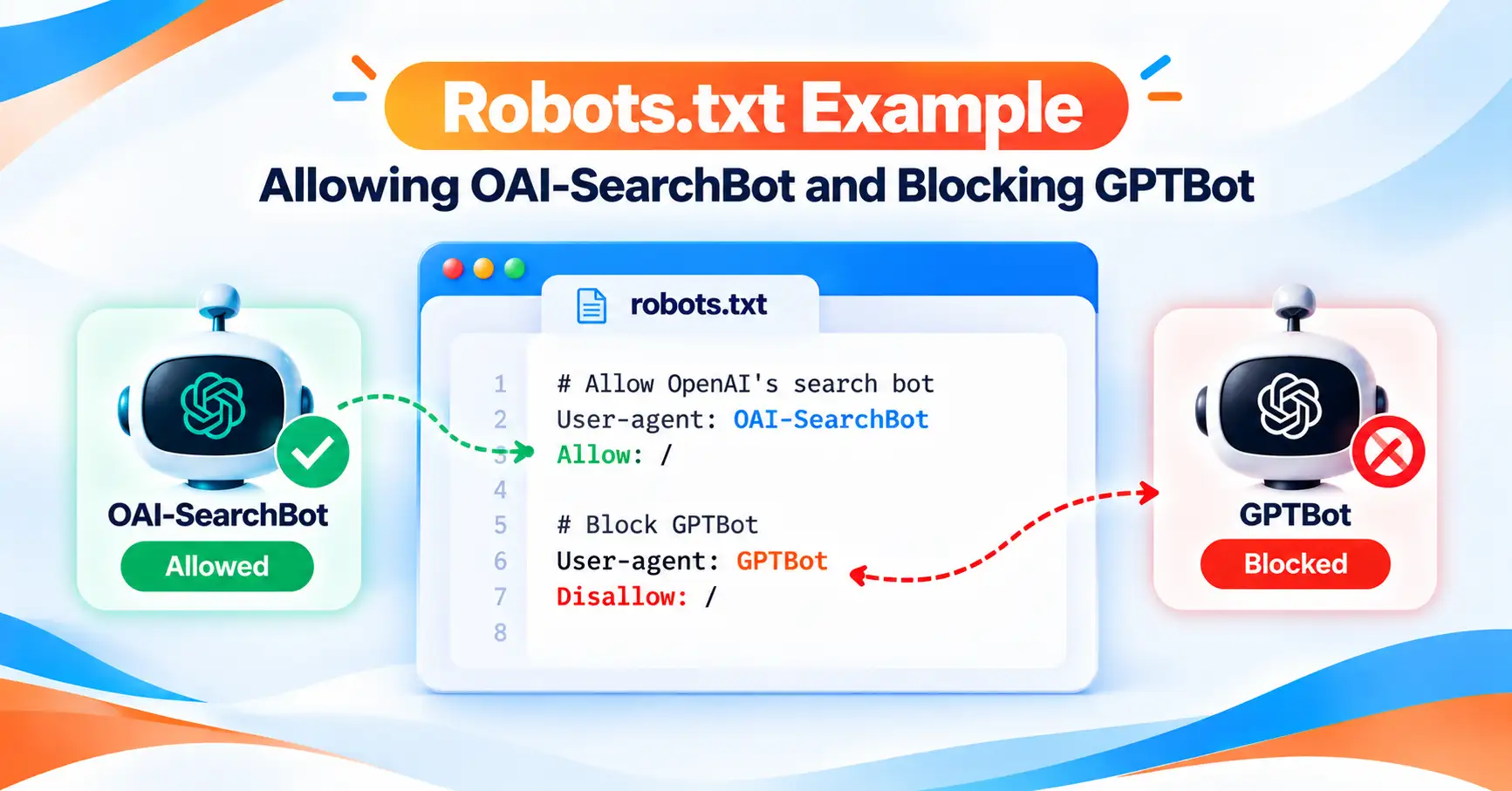
Your robots.txt file tells crawlers where they may go. It sits at yourdomain.com.au/robots.txt. Open it in a browser and look for “Disallow” lines next to the names below.
| Company | Crawler name | What it does |
|---|---|---|
| OpenAI | OAI-SearchBot | Finds pages for ChatGPT search answers. |
| OpenAI | GPTBot | Collects pages that may train OpenAI models. |
| Anthropic | Claude-SearchBot | Indexes pages for Claude’s search results. |
| Perplexity | PerplexityBot | Finds and links pages in Perplexity answers. |
| Googlebot | Crawls pages for Google Search, AI Overviews and AI Mode. | |
| Microsoft | Bingbot | Crawls pages for Bing, which powers Copilot. |
Here is the detail most guides miss. OpenAI’s crawler documentation treats search and training as separate settings. You can block GPTBot from training and still allow OAI-SearchBot, so you keep showing up in ChatGPT search.
- robots.txt does not block OAI-SearchBot, Claude-SearchBot, PerplexityBot, Googlebot or Bingbot
- Your CDN or firewall does not block AI crawlers (check Cloudflare’s AI crawler setting)
- Your site is verified in Bing Webmaster Tools
- You have decided on llms.txt, knowing what it can and cannot do
A CDN is a service that speeds up and protects your site. Cloudflare is the best-known one. Since July 2025, Cloudflare has blocked known AI crawlers by default on new domains. Your robots.txt can look perfect while Cloudflare quietly turns the bots away.
Bing matters more than most owners think. Microsoft says its AI Performance report covers Copilot, Bing and some partner AI tools. OpenAI says ChatGPT search uses outside search providers as well as its own crawler. It has not published the full list, so treat Bing as one likely source, not a confirmed one.
llms.txt is a plain text file that gives AI tools a short map of your site. It is a community proposal, not an official standard. Google says its search ignores it. Some AI agents read it, so adding one is a low-cost choice. Our guide to llms.txt shows how to write one.
2. Is your site technically healthy?
AI tools mostly use the same search indexes as normal search. An index is the giant list of pages a search engine has stored. Google says a page must be indexed and allowed to show a snippet before it can appear in AI Overviews or AI Mode.
So basic SEO health still comes first. Check these in Google Search Console.
- Your key pages show as “Indexed” in Search Console
- Key pages have no noindex tag and no nosnippet tag
- Each page’s canonical tag points to itself, not another page
- Your XML sitemap is current and submitted to Google and Bing
- Pages load fast on mobile
- Main content shows in the page text, not only after JavaScript runs
A canonical tag tells search engines which version of a page is the main one. JavaScript is code that builds parts of a page in the browser. Some AI crawlers read only the raw page, so text built by scripts can go missing.
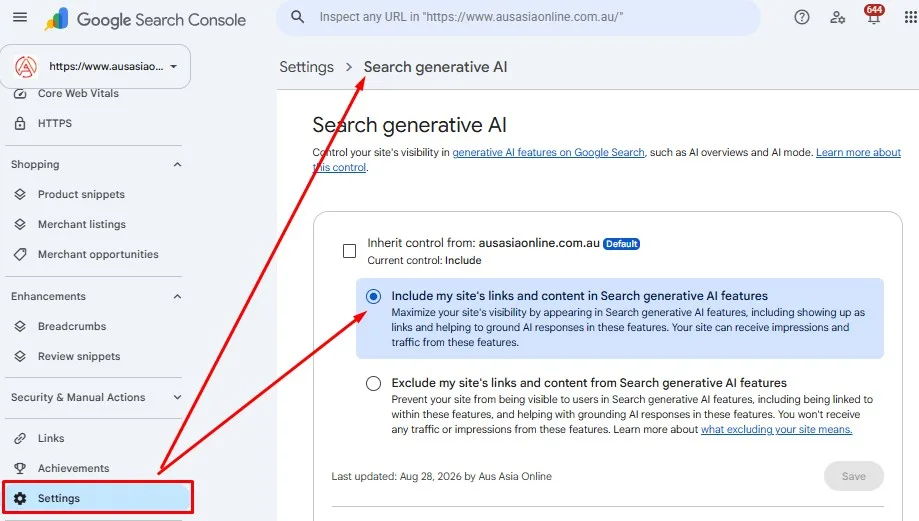
Google added one new setting worth checking. On 31 August 2026, Google rolled out a “Search generative AI” control in Search Console to every site. It decides whether your content can appear in AI Overviews and AI Mode. The default is to include your site, but check the setting under Settings to be sure.
- Search Console’s Search generative AI control is set to “Include”
Ecommerce stores have extra work here, such as product feeds and stock data. Our ecommerce SEO team handles that side.
3. Is your content easy for AI to quote?
AI tools pull short passages from pages, not whole pages. A clear answer near the top of a section is far easier to lift than a long build-up.
- Each key page answers its main question in the first two or three sentences
- Headings are phrased as the questions your customers ask
- Key answers sit in short blocks of about 40 to 60 words
- Prices, steps and comparisons sit in real HTML tables or lists, not images
- Main service pages have an FAQ section with real customer questions
Write for people first. Google’s July 2026 guidance on generative AI says you don’t need to chop pages into tiny “chunks” or rewrite them just for AI. Clear writing helps humans and machines alike. The 40 to 60 word block is our house rule of thumb, not a Google rule.
Want a deeper look at one engine? Our guide on how to get cited by ChatGPT covers ChatGPT on its own.
Short on time? Aus Asia Online runs AI search audits for Australian businesses. We check every item on this list and hand you a ranked fix list. Book an AI search audit.
4. Does AI know who you are?
AI tools try to work out who you are before they trust you. Search engines call your business an entity. An entity is a clear “thing”, like a company or a person, that a search engine can tell apart from others.
The more your details match across the web, the clearer your entity becomes. Australian businesses have a few extra signals most overseas guides skip.
- Your business name, address and phone (NAP) match on every page and listing
- Your ABN appears on your site and matches the record on ABN Lookup
- Your Google Business Profile is claimed, complete and up to date
- Organisation schema lists your name, logo, contact details and social profiles
- Articles show a named author with a short bio page
Schema is code that labels your page content for machines, such as “this is our phone number”. Google says no special schema is needed for its AI features. It still helps search engines read your details, so it stays on the list.
Google also says to keep your Business Profile current for its AI features. Our guide to Google Business Profile features walks through each field.
5. Do other trusted sites mention you?
AI tools don’t rely on your site alone. They look at what the wider web says about you. A mention on a trusted site works like a reference from a friend.
- You are listed on key Australian directories, such as True Local, Yellow Pages and Hotfrog
- Your industry body or trade association lists you
- You have recent, real Google reviews, and you reply to them
- Local news sites, partners or suppliers mention your business
Keep it real. Google warns that chasing fake mentions does not help, and its spam systems filter them out. Earned mentions last longer.
6. Is your content fresh and accurate?
Old facts lose trust fast. An AI tool that quotes your 2023 price list does you no favours. Fresh, dated pages give AI tools confidence in what they quote.
- Key pages show a visible “last updated” date
- Article schema includes dateModified, and it changes only when content really changes
- Prices, opening hours and service areas are correct today
- You review your top pages at least every quarter
dateModified is a schema field that tells machines when you last changed a page. Don’t bump it without a real update. That misleads readers and machines alike.
7. Can you measure your AI visibility?
You can’t improve what you can’t see. AI visibility does not show up in normal rank tracking, so you need separate checks.
- Each month, ask ChatGPT, Gemini, Perplexity and Copilot 10 customer questions and log the results
- Your server logs show visits from OAI-SearchBot, PerplexityBot and other AI crawlers
- GA4 tracks referral visits from chatgpt.com, perplexity.ai, gemini.google.com and copilot.microsoft.com
- You check the Generative AI performance report in Search Console
- You check the AI Performance report in Bing Webmaster Tools
GA4 is Google Analytics 4, the free tool that shows where your visitors come from. Server logs are records your web host keeps of every visit, including bot visits.
Two free reports now help a lot. Google’s Generative AI performance report shows impressions from AI Overviews and AI Mode. Bing’s AI Performance report shows citations across Copilot and Bing. For paid tracking, see our AI visibility tools comparison.
What can you skip?
Plenty of AI search advice adds work with little return. Google’s own guidance lists a few things its search doesn’t need.
You don’t need special AI text files to appear in Google’s AI features. You don’t need special schema. You don’t need to split content into tiny chunks. Those points come from Google’s AI features documentation.
Other AI tools may treat these things differently, and most haven’t said. So focus your time on groups 1 to 4 first.
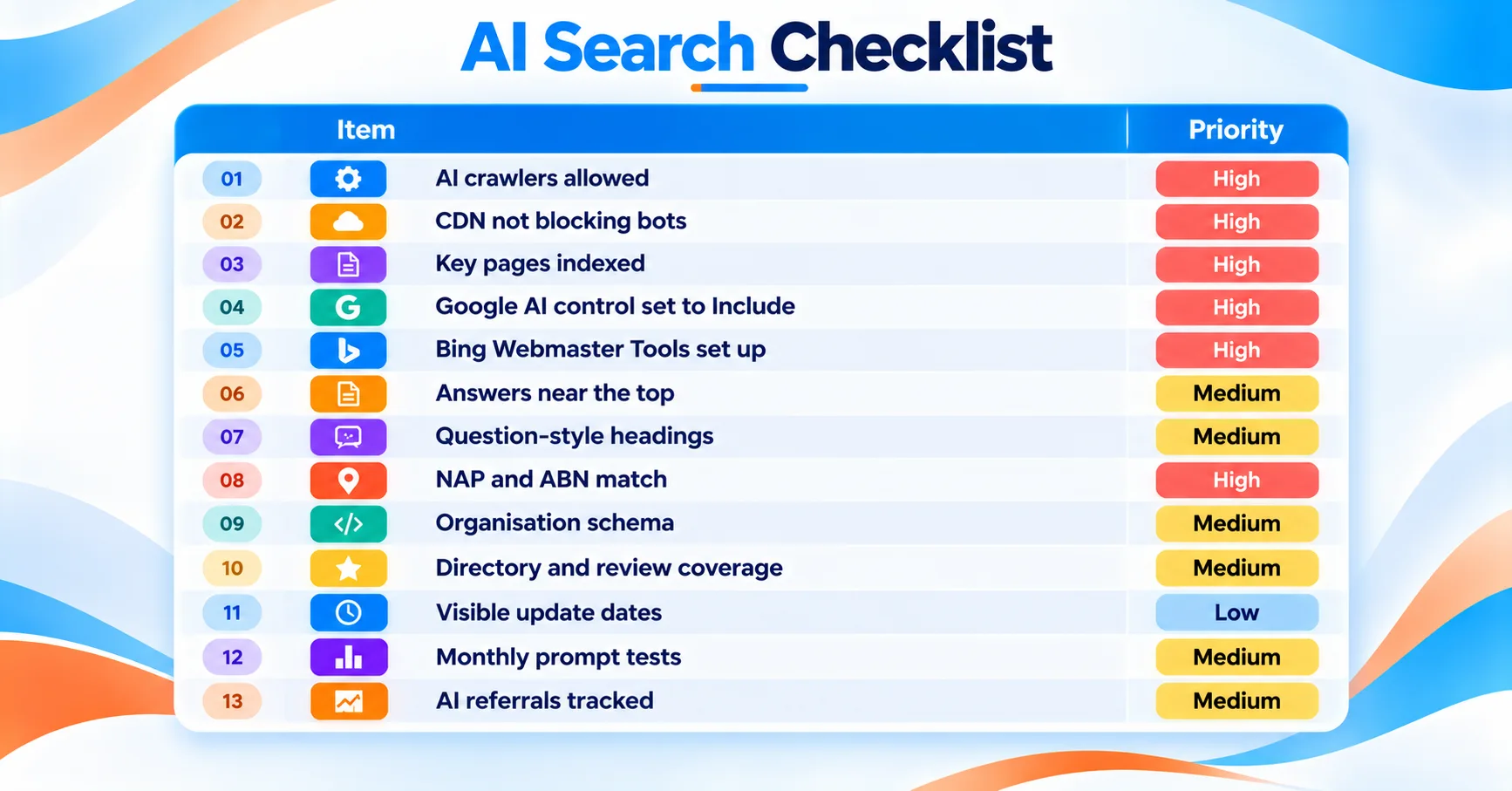
Your AI search checklist scorecard
Use this table as a quick AI readiness checklist. Mark each row pass or fail.
| Item | How to check it | Pass or fail | Priority |
|---|---|---|---|
| AI crawlers allowed | Open /robots.txt and look for Disallow rules | ☐ | High |
| CDN not blocking bots | Check Cloudflare or host bot settings | ☐ | High |
| Key pages indexed | Search Console, Pages report | ☐ | High |
| Google AI control set to Include | Search Console, Settings | ☐ | High |
| Bing Webmaster Tools set up | Log in and check sitemap status | ☐ | High |
| Answers near the top | Read your top 5 pages | ☐ | Medium |
| Question-style headings | Scan your H2s | ☐ | Medium |
| NAP and ABN match | Compare site, ABN Lookup and Google Business Profile | ☐ | High |
| Organisation schema | Google Rich Results Test | ☐ | Medium |
| Directory and review coverage | Search your business name | ☐ | Medium |
| Visible update dates | Check top pages | ☐ | Low |
| Monthly prompt tests | Check your log sheet | ☐ | Medium |
| AI referrals tracked | GA4, Traffic acquisition report | ☐ | Medium |
How do you run an AI search audit with this checklist?
An AI search audit is this checklist, run carefully, with a score at the end. Treat the scorecard above as your AI search audit checklist, then score it like this.
- Score every tick-box item: 2 for a pass, 1 for partly done, 0 for a fail.
- Add up the points and divide by the highest possible score. Multiply by 100.
- Fix any 0 in group 1 or 2 first, whatever your total.
Read your result like this. 80 or above means you’re in good shape, so focus on mentions and measurement. 50 to 79 means solid basics with clear gaps. Below 50 means start with access and technical health. These bands are our working rule of thumb, not an industry standard.
Run the audit again every three months. AI tools change often, and a quarterly check catches new blocks early.
Frequently asked questions
What is an AI search checklist?
An AI search checklist is a set of checks for your website. It shows whether AI tools like ChatGPT, Google AI Overviews and Perplexity can reach, understand and trust it. It covers crawler access, technical health, content structure, brand signals, outside mentions, freshness and measurement, so you can find and fix gaps in order.
Is a GEO checklist the same as an AI search checklist?
Mostly, yes. GEO stands for generative engine optimisation, which means improving how AI tools find and quote your content. A GEO checklist and an AI search checklist cover the same ground. Google itself calls this work SEO, since its AI features rely on its normal search systems.
Should I block GPTBot?
That depends on your goals. GPTBot collects content that may train OpenAI’s models. OAI-SearchBot finds pages for ChatGPT search. OpenAI treats them as separate settings, so you can block GPTBot and still allow OAI-SearchBot. That keeps you visible in ChatGPT search answers while opting out of training.
Do I need an llms.txt file?
Not for Google. Google says its search ignores llms.txt and that adding one neither helps nor harms. It is a community proposal, and some AI agents and tools do read it. For most small businesses it is a low-priority, low-cost extra. Fix crawler access and indexing first.
How often should I run an AI readiness checklist?
Run the full checklist every three months, and the prompt tests every month. AI tools, crawler names and settings change often. Google and Bing both added new AI reports in 2026. A regular check catches new blocks, outdated facts and lost visibility before they cost you enquiries.
Can I do an AI search audit myself?
Yes. Most checks need only your browser, Google Search Console, Bing Webmaster Tools and your Google Business Profile. The harder parts are reading server logs, fixing schema and changing CDN settings. Many owners do the checklist themselves, then bring in an agency for the technical fixes.
Get your AI search audit
A checklist shows you where the gaps are. Good fixes take time and technical skill.
Aus Asia Online has helped Australian businesses with search for more than 15 years. We hold a 5.0 rating from more than 95 Google reviews. Our SEO agency team in St Marys NSW will run every check on this list for you.
Book your AI search audit or call 1300 189 687.

Book a Free Strategy Session
1 business day response
100% confidential
No obligation
Client praise
Loved by clients across every industry
Your feedback is incredibly important to us. Explore testimonials from our valued clients — their words shape how we build every campaign.
See More Reviews
Trusted partners
We proudly work with different industries of all sizes
Client success is always a priority for us. We deliver high-quality solutions tailored specifically to our clients' needs — helping them achieve their goals across every industry.
NDIS & Disability
Dental
Chiropractic
Physiotherapy
Legal
Real Estate
Hospitality
Restaurants
Fitness
Trades & Building
eCommerce & Retail
Automotive
Tourism & Travel
Education
Some of our happy clients


We're ready to listen...
Leave your details below or call us on 1300 189 687 and let's chat about your business, your goals, and how we can help you grow. No obligation. No cost.